Facebook-f
Twitter
Google-plus-g
The Frontend Control Room
That Gives Your Audio Super Powers
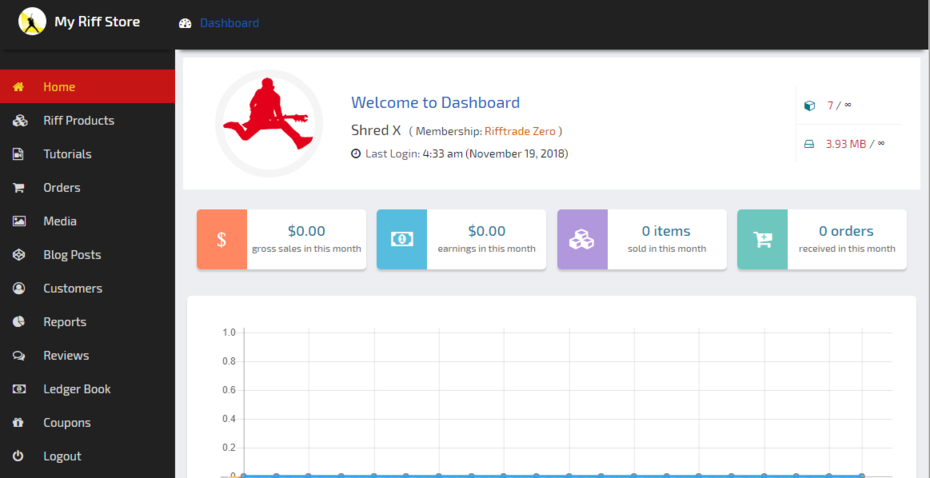
Now that your’e in the Riff Seeker Band, it’s time to dial you into the dashboard and show you around your Riff Seeker Store Manager.
This is the engine room for editing and monitoring your products, orders, adding coupons, blog articles, video posts , event campaigns and from here you can export your financials and analytics spread sheets to your computer or to the cloud.
Here you can do final tweaks to your product image, product name, description and then re-save them and they will be updated in your store.
All your uploads will now be visible under the “Riff Products” tab in the dashboard mini-side bar menu and in the ” My Riff Store” area, accessible from a few places as seen in this video.
Checkout this quick video rundown showing you around the control room dashboard. >>>
Made for Audio
Guitar – Recording – Applications
- Edit Digital Products
- Edit Blog Posts
- View Your Orders
- Submit Live Music Events
- Sell Band Merch
- Create Sale Coupons
- Fully Customisable Profile
- Detailed Analytics
https://www.youtube.com/watch?v=9uOETcuFjbE
Managing Your Riff Store
The Riff Store is where you want to look the second after youv’e launched a Rifftastic Track !
Once your’e all hooked up and jacked in , Enter The fun side of your Riff Store !
Once your Audio – Riff – Song or Multi-stem bundle has been submitted from the upload form and approved , they will land there.
Here you have tabs to display your featured video of your Youtube channel, Twitch feed , Instagram feed. Your store has all the bog standard sharing powers you need to attract hungry eye balls eager to taste your fresh musical chops.
After watching this quick tutorial you’ll be familiar with the Riff Store flow plus learn a few tricks on how to display your choice of media content on your shop page >>>
RockStar Megabytes
Secure storage included for your Uploaded Products.
https://www.youtube.com/watch?v=9uOETcuFjbE
Memberships Exposed
In case your’e a little fuzzy, This is a quick overview of how our memberships work.
Registration is completely free.
Wet your beak by cruising around as a casual free seller or go all in and build a riff empire if your’e so inclined…
Level up to the premium tier if you want an All Access pass to insider promos, music industry group buys and educational discounts…
We have 3 main memberships.
*Riff Seeker Free – *Riff Seeker Premium and the annual *Mega Watt Plan ( inlcudes the whole enchilada ).
We wont Spam you – We’ll just serve you Pure guitar driven promos to tempt your GAS trigger finger every now and then…;)
It’s your online business so yep ofcourse there’s an upgrade path for when sales are rising and you want to scale up…
Watch this video and see all the features & benefits of each plan >>
See All Memberships
Access All Areas for 30% less
https://www.youtube.com/watch?v=9uOETcuFjbE
Uploading Riffs as Audio Products
The more Credits you buy – The more Free Credits you get !
Upload Credit Stacks are the fuel that runs this show.
They are cheap, Never expire and you will get Free credits each time you purchase any of our credit stack packs.
There are two pricing plans.
One for Free vendors and one for Premium vendors.
It’s really simple !
The more you upload – The more you upload …for free !
Checkout the video to see how to navigate the upload page, get the credit lowdown and find out what rewards & bonuses you receive for each pack you buy. >>>
Upload Credits
See All Credit Stacks
https://www.youtube.com/watch?v=9uOETcuFjbE